AI Workflow vs AI Agent: How to Pick the Right One
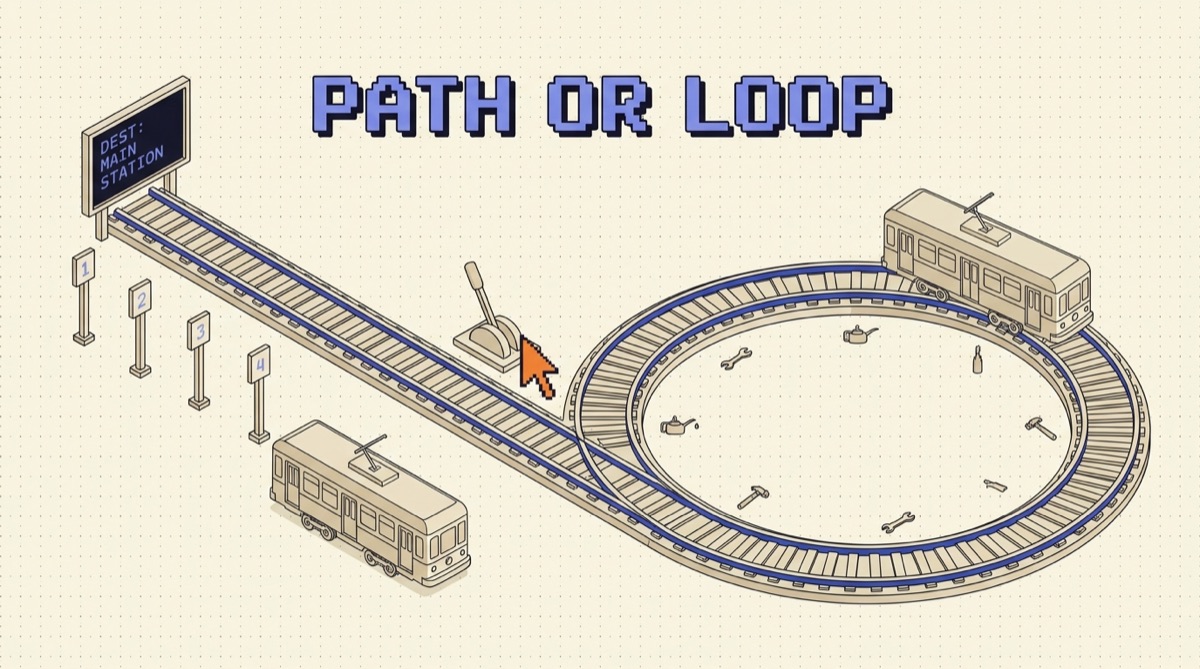
An AI workflow runs a path you defined: fixed steps, fixed order, the model filling in the language-shaped parts. An AI agent runs a loop you did not define: it picks its own tools, its own order, and its own stopping point to reach a goal. The choice comes down to one question, which is whether you already know the steps. Most teams reach for the agent when they knew the steps all along.
TL;DR
- The only real difference is who decides the next step. You do in a workflow, the model does in an agent. Everything else is downstream of that.
- If you can draw the flowchart before you see the input, build the workflow. It is cheaper, faster, testable, and it fails in one obvious place.
- Agent runs commonly cost four to fifteen times the equivalent workflow, because every step re-sends the accumulated context of the steps before it.
- Most production systems that work are workflows with an agent in exactly one slot, not agents all the way down.
- Measure path variance. If 90 percent of your agent runs take the same route, you built the wrong thing and your traces already know.
The difference is who decides the next step
Strip away the frameworks and the argument is small. Both approaches use the same model, the same tools, the same API. The split is control flow.
A workflow is code with model calls in it. Step one extracts fields, step two validates them, step three routes to a queue, step four writes a record. The model does the language work inside each step and none of the deciding between steps. Run it a thousand times and you get the same four steps in the same order, because you wrote them that way.
An agent is a loop with a goal in it. You hand the model a task, a toolbox, and permission to keep going until it decides it is done. It reads a result, decides what that implies, calls the next tool. Two runs on nearly identical inputs can diverge at step two and never converge again.
That is the whole distinction, and it is worth being pedantic about, because the words get used loosely. A prompt chain is not an agent. A model that picks one of three branches is barely an agent. A system that calls tools in a loop until it decides it is finished is an agent, and it should be treated as one when you budget for it.
The autonomy ladder has five rungs, not two
Framing this as a binary is where most of the bad decisions come from. In practice there is a ladder, and each rung buys capability with control.
Rungs one through three are workflows. Rungs four and five are agents. The useful observation is that rung four, a tool loop with a hard step cap and a small tool set, covers most of what people actually want when they say they want an agent, at a fraction of the risk of rung five. Start there and climb only when a real run hits the cap for a good reason.
Four questions that pick for you
Skip the vibes. These four settle it in about ten minutes.
Can you write the flowchart today? Not a rough sketch. The actual steps, including the branches. If yes, build the workflow. You already did the reasoning the agent would be paying tokens to redo on every run.
Does the number of steps depend on the input? Extracting fields from an invoice takes the same work whether the invoice is simple or messy. Debugging a failing test might take two steps or twenty depending on where the bug is. Variable step count is the honest signal for an agent.
What does a wrong answer cost? If the output goes straight into a ledger, a customer email, or a production database, you want deterministic steps and validation between them. If a human reviews the output before it counts, an agent gets more room.
Does cost per run need to be predictable? Workflows quote cleanly. Agents have a long tail, and the tail is made of exactly the confused runs you least want to pay for.
Three of four pointing the same way is a decision. Two and two usually means the task should be split, with the predictable part as a workflow and the uncertain part scoped into one agent step.
What each one looks like in practice
A workflow, concretely: a support ticket arrives. Step one classifies it into one of eleven categories with a single model call. Step two extracts the account id and pulls the customer record from the database in plain code. Step three drafts a reply using the category template plus the record. Step four validates that the draft contains no dollar amounts and no promises about timelines, then queues it for the agent on shift. Four steps, two model calls, roughly a second, and every step has a unit test. When quality drops, you know which of the four moved.
An agent, concretely: a test is failing on main and nobody knows why. The agent reads the failure, greps for the symbol, opens two files, notices a config default changed three commits ago, reads the diff, writes a fix, runs the test, sees a second failure, adjusts, runs again, passes. Eleven steps that no flowchart would have predicted, because the path was determined by what the code turned out to say. That is a genuine agent task, and the same job as a fixed pipeline would be a worse product.
The tell is in the second example: the agent read something at step three that changed everything after it. If your task has no step like that, you do not have an agent task. The looping structure that makes this work, and the discipline of writing the loop rather than a longer prompt, is the whole idea behind WRITE LOOPS NOT PROMPTS.
The shape most production systems land on
The teams shipping AI features that survive contact with users almost never build one or the other. They build a workflow with one agent-shaped hole in it.
Deterministic code owns intake, auth, validation, persistence, retries, and delivery, because improvisation adds nothing to any of those. One step in the middle is genuinely open ended. That step gets a scoped agent with three or four tools, a step cap around ten, a cost ceiling, and a typed result the surrounding workflow validates before accepting.
The win is containment. The non-determinism is inside one box with a known interface, so a bad run gets retried at the box, not at the whole pipeline. You can test everything around it normally. You can swap the agent for a cheaper model or a hard-coded rule later without touching the rest. And you can point at one line in a trace when someone asks what went wrong.
Going the other direction is much harder. An agent that grew organically has no seams to carve along, and adding structure back means rewriting the parts you were most afraid to touch.
How to tell you built the wrong one
Your traces answer this, if you log path variance from day one. Record the ordered sequence of tool names for every agent run and count how often each unique sequence appears.
If one sequence covers most of your runs, the model is rediscovering a path you already know. Hard-code it, keep a workflow, and spend the savings on a better model for the one step that needed judgment. If the distribution has a real tail and the sequences track the shape of the input, the agent is earning its keep.
Two more signals worth an alert. The same tool called twice in a row with near identical arguments usually means a missing step, not reasoning, and the fix is a new tool rather than a better prompt. Step counts piled up at your cap mean the agent is not finishing, and shipping that is shipping a coin flip. I write up these kinds of patterns as they show up in real builds in the newsletter.
The bottom line
Ask who decides the next step, then be honest about the answer. If you know the steps, write them down and let the model do the language work inside them. You get a system that is cheaper, faster, testable, and boring in the way production software should be.
Save the agent for the tasks where the path genuinely depends on what the model finds along the way, give it a step cap and a cost ceiling on day one, and contain it inside a workflow that validates whatever it hands back. Start one rung lower on the ladder than feels right. Climbing is easy, and it is a much better position than trying to add structure to something that already has none.
What is the difference between an AI workflow and an AI agent?
The difference is who decides what happens next. In an AI workflow, you decide. You write the steps in code, in a fixed order, and the model fills in the parts that need language: extract these fields, classify this ticket, draft this reply. The path is the same on run one and run ten thousand. In an AI agent, the model decides. You give it a goal, a set of tools, and a stopping condition, and it chooses which tool to call, in what order, and when it is finished. Two runs on similar inputs can take different paths. Everything else people argue about (frameworks, memory, planning modules) sits downstream of that one question. A useful test: draw your system on paper. If you can draw the arrows before you see the input, it is a workflow. If the arrows depend on what the model reads at step three, it is an agent.
When should I use an AI workflow instead of an agent?
Use a workflow when you already know the steps. If a competent human would do the same five things in the same order every time, encoding that order in code is strictly better than asking a model to rediscover it on every run. You get lower cost (one or two model calls instead of eight), lower latency, deterministic behavior you can unit test, and failures that land in a specific step instead of somewhere in a chain. The classic fits are document extraction, ticket triage and routing, content transformation, enrichment pipelines, and anything with a compliance or audit requirement. The rule of thumb that holds up in production: if you can write the flowchart, write the flowchart. Reach for an agent only when the flowchart would need a branch you cannot enumerate in advance.
Are AI agents more expensive than workflows?
Yes, usually by a lot, and the multiplier is bigger than people expect. A workflow with a fixed path makes a known number of model calls, so its cost per run is close to constant and you can quote it before you ship. An agent re-sends its growing conversation on every step, so a run with ten steps does not cost ten times a single call, it costs more, because each step carries the accumulated context of all the steps before it. In practice an agent run commonly lands somewhere between four and fifteen times the cost of the equivalent workflow, and the tail is worse than the average because confused runs take the most steps. That is why step limits, per-run cost caps, and prompt caching are not optimizations for agents, they are load-bearing. If cost per run needs to be predictable, that is a strong argument for the workflow.
Can you combine an AI workflow and an AI agent in one system?
That is what most good production systems actually are. The pattern is a workflow skeleton with an agent in exactly one slot. Deterministic code handles intake, validation, routing, persistence, and delivery, because none of those benefit from improvisation. One step in the middle is open ended (research this claim, debug this failing test, reconcile these two records) and that step gets a scoped agent with its own tools, its own step limit, and a typed result the workflow can validate. The value is containment. The agent's non-determinism lives inside one box with a defined output, so when it misbehaves you retry that box instead of the whole run, and everything around it stays testable. Starting with a workflow and carving out an agent-shaped hole later is much easier than starting with an agent and trying to add structure back.
How do I know if my agent should have been a workflow?
Look at your traces. Three signals give it away. First, low path variance: if 90 percent of runs call the same tools in the same order, the model is spending tokens rediscovering a sequence you already know, so hard-code it. Second, the same tool called back to back with near identical arguments, which means the agent is compensating for a missing step rather than reasoning. Third, tight step counts clustered around a single number, which means there was never a real decision to make. On the other side, if your step counts have a long tail and the tool sequence changes with the input, the agent is earning its cost. Instrument path variance early. It is the single cheapest number for settling the workflow versus agent argument, and it is an argument that should be settled by data rather than taste.
OpusJake is Jake Schincariol's operating system for building with AI: agents, workflows, prompts, and the free resources behind them. Get the next move every week.